Showing posts with label rubric. Show all posts

Thursday, December 3, 2009

Backchannel Baking

I've had a busy few weeks getting into the swing of things with school but yesterday's class showed how my students are really hitting their stride implementing technology as a tool in the classroom. I would like to place great emphasis on the word TOOL, instead of what often happens which is an add-on.

The recipe from the outside seems like it's destined to be a flop, but here's how I created this backchannel lesson. Take our first ingredient of grade 9 students and throw them into a large mixing bowl (also known as our performing arts theatre). This is no slouch of a theatre! With a Blu-Ray player and HD projector with AMAZING sound, movies in the theatre rock! Then mix gently and let students sit wherever they want (only in the first 2 rows).

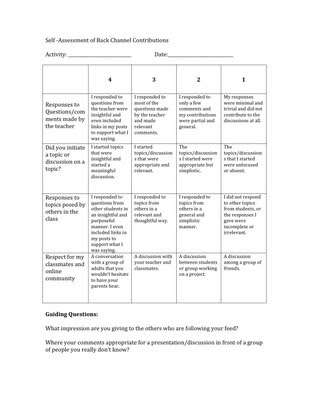
Sprinkle in short lesson on backchannel, google jockeying and have a discussion about what the students think they should be mindful of when having an online conversation. This is one of Anne Davies' assessment for learning strategies. She writes, when a teacher "Involve[s] students in setting and using criteria," "they become more engaged in learning."

Don't forget a key ingredient: the rubric. Students need to mix the idea of interacting in a meaningful way in their brains and connect it to technology. For some this is a HUGE step, which is why we will be practicing it more and more in the coming weeks. We discussed the personal and social implications of contributing to backchannel online, and how we can make the experience positive and productive. Students did a self assessment of their experience and then blogged about the positives and negatives of their experience. Most thought it was productive, but a few found watching a movie and participating in the backchannel distracting.

This again confirmed for me that students are not the "digital natives" and tech multi-taskers that some people believe they are. Next time I use backchannel I will pause the movie frequently to allow more in depth discussions to occur with less distractions.

How might you use backchannel in your class?

Note: this lesson happened in early October and I'm just now getting around to publishing this post!
Friday, April 3, 2009

Using Twitter in Language Arts Part 1

A quick post today about the Twitter experiment I performed in my Language Arts 9 class. Following what many are doing at conferences, I introduced a tag in Twitter for my students to use while tweeting about the movie Into the Wild. 

Introducing Twitter to Students

None of my students had Twitter account, nor did any of their parents. So, I started with introducing them to Twitter in general with a Commoncraft video, and explained how we can use tweets in many different ways. Showing them my own Twitter account I had them see the difference between a personal/social and a professional/educational tweet. 

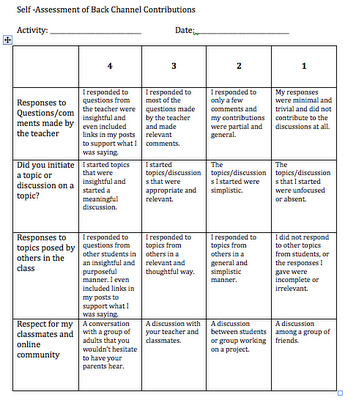
We then look at a quick rubric I developed. The rubric included the following 4 criteria:

1.  Responding to 'teacher tweets', questions and topics I give them and they need to respond to.

2. Student initiated topics that encourage discussions.

3. Student responses to topics/discussions started by their peers.

4. Respect for their peers and the online community.

Note About the Rubric
After a short meeting with our Technology Integrator Terry Kaminksi, he came up with the idea for the "Respect for classmates and online community" portion of the rubric. I am still working on connecting the wording in the rubric to the students in a meaningful manner, and this is what we came up with. I explained to the class that they need to be thinking of their Tweets in terms of a conversation with various groups  that they might encounter during the day, and how much 'off topic' talk there might be in each situation. 

4/4- a conversation with adults that would make your parents proud.

3/4- a discussion in class with teachers and peers with the occasional off topic comments.

2/4- a discussion during a student led project that goes off topic quite easily.

1/4- a discussion among friends in the hallway that is often off topic and is sometimes not appropriate.

Introducing Twitter Took Time
This pre-movie introduction of the concept of Twitter, showing the difference between a personal/social and professional Tweet, and the explanation of the rubric took about 40 minutes of our 84 min period. It proved to be very helpful and the vast majority of Tweets were on topic while watching the movie.

But then Twitter threw us a curveball...

Twitter was extremely slow while the internet raced right past it. I suggest you don't try this on a Friday afternoon when everyone and their dog is trying to waste time Tweeting what their plans are for the night instead of working. We kept getting the Twitter whale message that the service was overloaded. Tweets were taking several minutes to show up in our search. Check out our tag search here and see what we did with the first few minutes of the movie. 

Will We Tweet Again?
The short answer is YES! We will try again on Monday afternoon with the rest of Into the Wild. I will definitely use Twitter again in the class for discussions, watching films and if was lecturing (which rarely happens, but I can see it's application). The slow afternoon of Tweeting will not deter me from seeing Twitter as a great educational tool with many applications. How could you use Twitter in your class? Will you give it a try? 

Participate in the Discussion
Remember to follow our tag starting at about 12:30pm mountain time on Monday, April 6th. Feel free to tweet in about the movie or book and answer or ask questions of my students! I'll drop a few lines to summarize the experience after tomorrow's class!


Saturday, March 28, 2009

Assessment of Blogging In the Classroom


A few months ago if someone had asked be about evaluation of blog writing in my classroom, I would have given them the same look that my son did this afternoon.

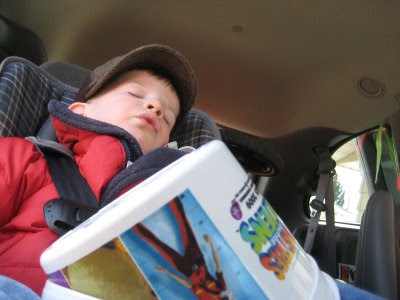
It's my son at our latest outing to a 3D movie, but that's exactly the deer-caught-in-the-headlights kind of look that I might have given. Blogging in the classroom is one thing, but blogging with a purpose was something quite alien to me. Not to say that there wasn't a purpose, but I was using blogging solely as discussion starters and getting through writers block with my grade 9's. This was working very well, but as I got a new set of students in semester 2, I wanted to take our blogging to the next level. 

Thanks to my growing PLN I have worked to develop the first of 3 types of blog posts based on the grade 9 Alberta Language Arts curriculum (this link opens a PDF document). 

 A special thanks must be given to Neil Stephenson for his revisions and especially Deana Senn for her time, patience and guidance with this!

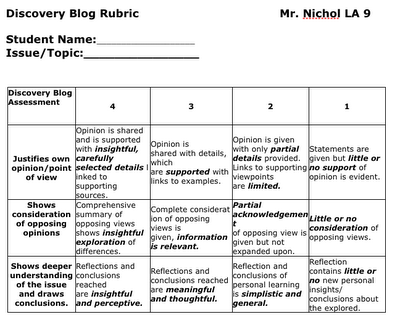
The first type of blog post that I created is called a "Discovery Blog". I pose an issue based question that students must take a side on and then must investigate further. After introducing the rubric (linked below) I realized that I was going to have to get them to practice this type of writing to gather exemplars, because I had none. We looked at several blogs (from many of you out there) and talked about the formats, and how most blogs include links to supporting sites and details. They then wrote about the journey of Chris McCandless, and I asked students if they thought that the publicity in print and on the silver screen would bring about copycats. This was their practice blog. At the end of the week they responded to the question of whether or not Chris McCandless cheated his family and friends by leaving it all behind, which I am going to evaluate this weekend. 

The Discovery Blog has 3 main components that are evaluated:

1. Defending and supporting your own opinion (with links to relevant articles, 
posts, etc. on the web)

2. Acknowledgment of the opposing viewpoint and identifying possible support details. 

3. Reaching a personal conclusion/reflection as to whether or not your opinion has changed after looking at both sides of the issue.

Here are the guiding statements that accompany the rubric:

Justification your opinion/point of view 

- Support with examples from personal experiences and the experiences of others.  

- Keywords are linked to sources that support your opinion on the issue. 


Shows consideration of other points of view 

- Examine the issue from an opposing point of view, what are the pros to their arguments? 

- Ask yourself, how do others' opinions affect your point of view? 

- Explore the differences in your opinions further. Where can you get more information on the issue/topic?

- What do you now know that you didn't before you started the process? 

- Provide evidence of your consideration and link to it in your blog post. 


Shows deeper understanding (reflection) of the issue and draws conclusions

- After considering the sources and listening to others, how do you see this issue?  

- Do you see it in another way? How has listening to others and considering other sources affected your view 

on this issue? Why did it change/not change your mind? 

- Communicate your understanding of the topic by responding to other's blogs.


The rubric for evaluation is as follows (email me: coolpoolteacher@gmail.com - and I will send you a word document so you can amend it as you please):


The students used this to practice with the first topic of publicity causing copycats. I used this first submission from their writing as exemplars. Here are two samples of their writing of varying levels. Take a moment or two and click on the large size to really read their writing. 


So, it's off to develop blog assessment #2 and #3. I'll finish them up in the week ahead to share with you, and I'll post some exemplars from the final drafts of my students writing for the Discovery Blog. PLEASE comment on what I have developed and make suggestions via email or on this blog. If you would like I can also "share" the original Google Document with you for even easier editing!


Hopefully you can now take a look at how you are using blogging in your classroom. With some work you can help take something that is still "Alien" to your students and wake them up from what can become a writing slumber.

(the popcorn and movie in 3D meant a much needed nap on the ride home from the theatre!)